The keywords of your Sponsored Products campaigns
SellerScale gives third-party Amazon sellers the keywords of their product, with the monthly search volume, the trend and the ranking of each one. That list is what a Sponsored Products keyword list is built from. Tell us the product you sell and the marketplace, and it is waiting for you inside the application.
The search volume, the trend and the related keywords of that product are inside the application. Free 7 day trial, no commitment.
Available today
In every SellerScale product sheet, the seller gets that product's keywords. For each keyword, three pieces of information:
- Search volumeper month
- How many times that keyword is typed each month into the Amazon search bar, on the product's marketplace.
- Trenddirection of change
- Which way that search volume is moving: rising, flat or falling.
- Rankingprimary or secondary
- Whether the keyword is a primary term for the product, the one it ranks on first, or a secondary term.
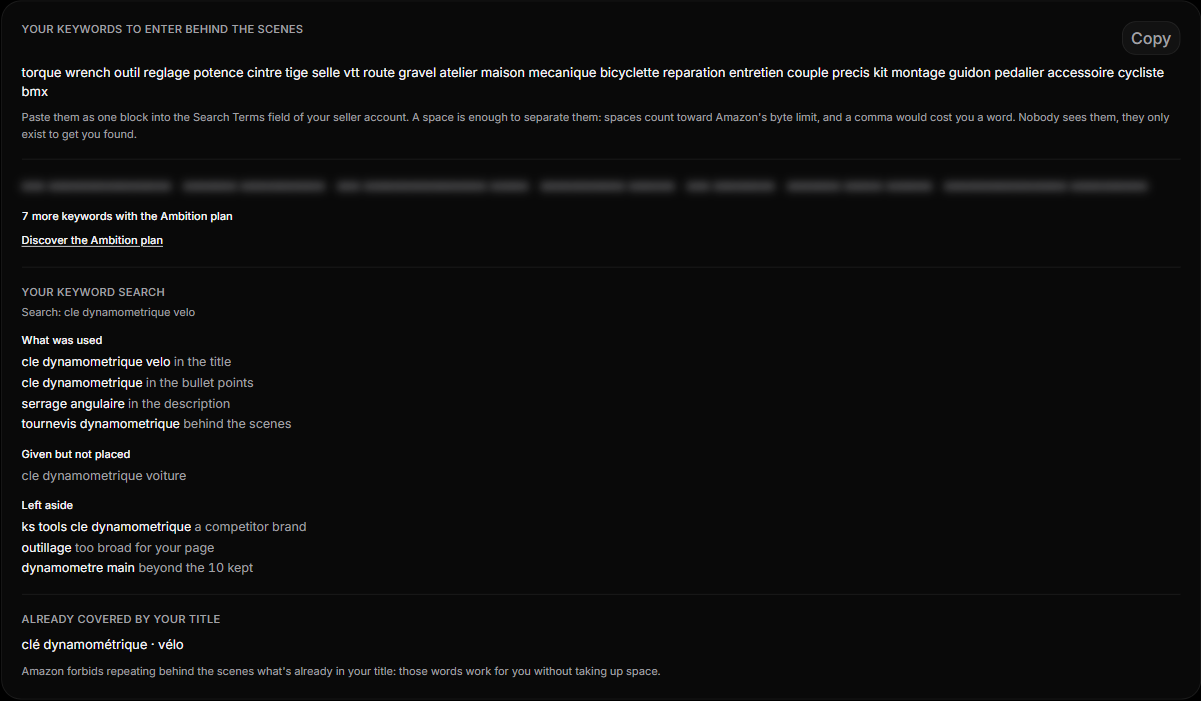
These keywords serve two purposes. First, writing the listing: the title, the bullet points, the description and the keywords to enter in the Amazon seller account. Second, building the keyword list of a Sponsored Products campaign in Amazon Ads, starting from terms whose volume and trend are already known.
Available in production today, on every product sheet.
Coming later
The three items below are not available. No date, no price and no subscription plan is attached to them.
- Standalone keyword researchKeyword research outside the product sheet, with CSV export, for campaign preparation.
- Amazon store connectionSales, inventory, Buy Box and competitor prices, on the seller's authorisation for their own account.
- Sponsored Products campaign reporting inside SellerScaleReporting through the Amazon Ads API: spend, impressions, clicks, orders, ACoS per campaign and per keyword, search terms behind the conversions. Access authorised by the seller on their own account.
Who it is for
Third-party Amazon sellers, on the France, Germany, United Kingdom, United States, Canada and Japan marketplaces.
The keywords described in the first section are visible on every product inside the application.
Create a SellerScale account →